A user contacted me with a problem:
A coworker has a Contact group that I want to import into my Outlook. He shared his Contacts with me but the group doesn’t work.
Your coworker can send the group to you as an Outlook item, using Forward as Outlook Contact, and it should work, but you may not be able to update it because the contacts don’t exist in your Contacts folder; members may be deleted from the group if you try to update it.
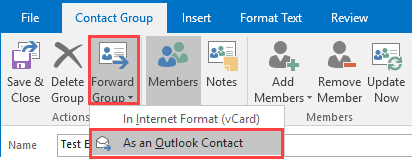
When you receive the forwarded contact group, drag it from the message to the contact folder icon in the folder pane and drop or open it, then use File, Move to Folder, Other folder command to copy it to your contacts folder. (Because the Contact group is an attachment, you can use either Move to folder or Copy to folder, either will make a copy in the select folder.)
If you aren't using Exchange server, the Contact Group needs to be sent in an RTF formatted message, to prevent the Contact group from being converted to an HTML message. If the recipient doesn't receive it as a Contact group, you'll need to use Forward in Internet format. They can create a contact group from the list.
Saving it to the desktop and zipping it before attaching it will also work.
Forward in Internet format
Use this method to share the addresses in a distribution list with anyone, even if they do not use Outlook, or to extract the addresses from a Contact Group (distribution list).
- Open the Contact Group (Distribution List in older versions)
- Outlook 2010 and up: Click Forward Group
Outlook 2007 and older: Click on the Send button to expand the menu.

- Select In Internet Format (vCard)
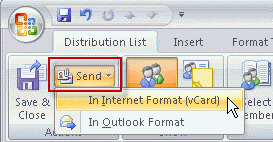
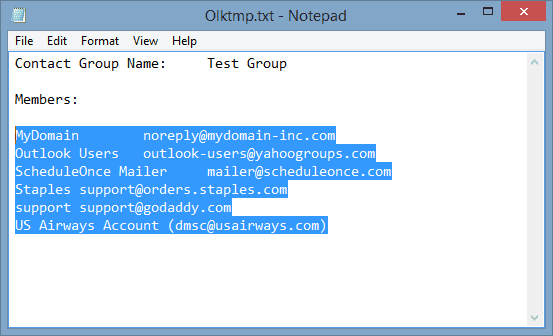
This opens a new message form with the members of the Contact Group (DL) contained in a text file attached to the message.
If you are using this method to create a text file of the group members, you can also use the File, Save as menu and save the DL as a text file. (In Outlook 2007, Save as is on the Office icon's menu.)
Save List to a Contact Group
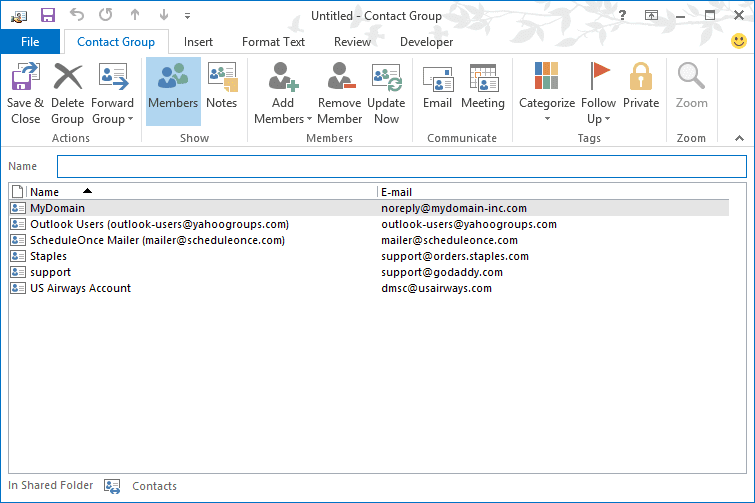
Once the recipient receives your forwarded contact group list, they need to copy the rows containing the names and address and paste them into the Members field of a new Contact Group.
- Open the Text file attachment.
- Select and copy the rows of names (copy all names at once)
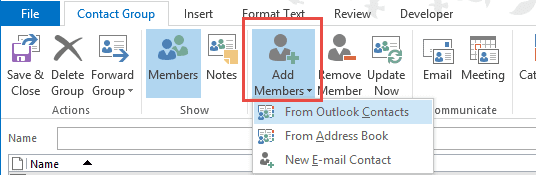
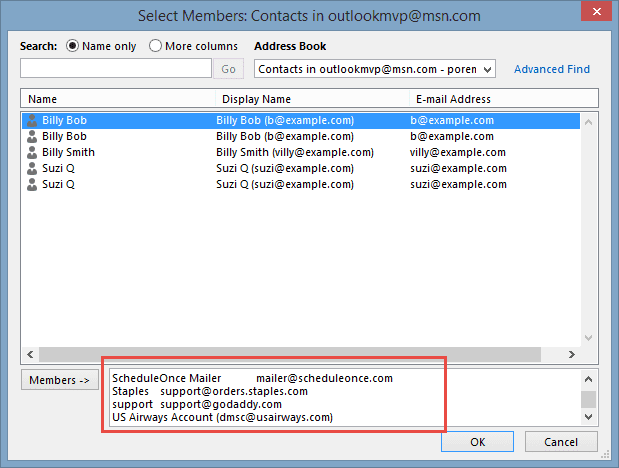
- In the contact group form, click Add Members, From Outlook Contacts
- Paste the names into the Members field at the bottom of the dialog
- Click OK.
- Enter a name for your group and Save

Javi S says
Got a scenario in when forwarding an Outlook Contact Group to an internal recipient, the Outlook Contact Card does not contain the members of the contact group
Bryan Richter says
Open the Contact Group created. Go to File/Move To Folder/Copy to Folder and select the Contacts Container. Click OK
Cassandra says
I am trying to forward a contact group to another outlook user, but when I do, the only information that gets forwarded is the name and email address of each contact, but I want all of the information to be forwarded, such as phone numbers, physical addresses, etc. Help?
Diane Poremsky says
Contact Groups don't contain any contact info. If you want to send that, you need to send the individual contacts too.
If you can run a macro, the macro at https://www.slipstick.com/developer/add-category-contact-contact-group-dl/ will add a category to the members of a group - this makes it easier to find the contacts that belong with a group.
Tamisa says
I have created a distribution list. I want to email this to the members. How can I do this?
Diane Poremsky says
You need to insert it as an outlook object - right click on the contact group in outlook and choose Forward > and an outlook contact. But it will only work if you are using Exchange and sending it to coworkers. Otherwise, send the text file created by forward and tell the recipients how to create a DL in their outlook.
Jerome Smith says
Diane, would that person have to create his own distribution listing after he is sent the vCard list?
Diane Poremsky says
Yes, they would need to create their own contact group.
Debby says
I have a contact group that was forwarded to me. It is read only. How do I save it to my contacts?
Diane Poremsky says
How are you opening it? It might be read-only due to the way it was opened.
Can you forward the group as an Internet vCard? That will create a message with the DL members listed in a text file. You can paste it into a new Contact Group.
Javier O says
Another way, probably much easier, is that outlook contact groups are objects that are shared in exchange server and only short links or programmatic shortcuts are sent so the only way to send them to an external recipient is to first create a duplicate of it by saving it to your computer like your desktop with the save us option on the contact group to be sent.
once saved, find the msg file saved and right click on it and go to send to mail recipient and send it!
you will see a different behavior on the recipients outlook when you try to open the item and a warning but it is because contains a copy of the exact item you wanted to send :)
I know no one answered this or explained it so hope this helps to all of you.
Javier O
VNDhost
Diane Poremsky says
The method I recommend eliminates the warnings. :) It breaks the links to the contact, but unless the DL contains only addresses in the GAL or one-off (no contact exists) addresses, you'll break the link anyway.
Linda Alcott says
I am new to office365. I successfully moved my contact list from outlook 2010 to office365. I can see the contact list when in my email home screen. I am attempting to build a group distribution list. I successfuly created the group name, but when I go into "member" and click add, to add names off of the contact list, the little icon which is suppose to pull up the contact list respondes "no items"... Can you please help... thank you! linda@lindaalcott.com
Diane Poremsky says
Are you using Outlook or web access?
If Outlook: If you start a new message and click the To button, do you see names? If not, see Missing addresses - this should fix the contact group problem too.
Steve Ambrose says
Hi Diane thank you for the information to share a distribution list. How is the best way to install a distribution list once recieved in email using outlook? The attachnment appears like a blank email so far...
Steve
Diane Poremsky says
Is there a text file attached? If so, open a new DL form, copy the rows of names out of the list and paste it into the Members field of the DL.
If its really a blank message, the person will need to resend you the list using Forward in internet format.