We've had a lot of people complaining that a range of old appointments are missing from the calendar. For example, in November they notice appointments from July and earlier are still in the calendar but appointments in August and September are missing.
When all old appointments go missing AutoArchive is the most likely culprit, but AutoArchive doesn't delete recent appointments and leave much older appointments in your calendar, so we know that it’s not an archive problem.
Looking in my crystal ball, I see the a new handheld device was put into service right about the time of the first missing appointments and its being synchronized it with Outlook.
Because the appointments were deleted by the device and synced to Outlook they may not be placed in the Deleted items folder. If they are not in the Deleted items folder you won't be able to recover the items - you'll need to restore them from a backup file.
The Cause
Typically, sync software defaults to syncing current appointments and deletes appointments older than a few weeks to conserve space, with a default setting of 60 days (8 weeks) or similar. When appointments are deleted from the handheld, the sync process deletes them from Outlook too. So after a few weeks of use, appointments are deleted from the handheld to free up space and then from Outlook on the next sync. The calendar will have appointments for dates before the first sync and very recent dates but the period between the first sync and a few weeks ago are missing.
The Solution
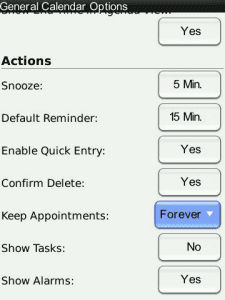 Set the handheld to keep appointments forever. If you need to free up space on the device, use AutoArchiving in Outlook to remove appointments from Outlook. When you archive them, the next sync will remove them from your handheld.
On a Blackberry, open the Calendar, press the Blackberry button to expand the menu and choose Options. The setting that controls how long items are kept is near the bottom of the General Options page.
Items deleted in the sync process are usually not recoverable. If you don't have a backup they are gone forever.
Syncing Tips
Always, always back up your contacts and calendar when you get a new handheld and start syncing with Outlook. We see too many reports of disappearing appointments and contacts when users start syncing with a new device, even from people who are family with syncing. It's too easy to forget to change a setting and lose everything or end up with duplicates.
More Information
See Duplicate Remover Tools for Microsoft Outlook for additional options.

rntgrt says
Does AutoArchive on clendar start the counting from the creation or from the start/end date?
thank you very much!
Diane Poremsky says
The default for AutoArchive is to use either the start date or the modified date, whichever is later. You can set a registry key to only use the start date and ignore the modified date.
https://www.slipstick.com/outlook/archive-outlook/autoarchiving-received-date-outlook/
Gill says
I Have a aspire one 725 notebook. my calendar from jan 14 - Jun 14.. everything is missing. how can I re install whats gone ??
Diane Poremsky says
What type of email account? Are you using AutoArchive? Syncing with a smart phone?
Joanne says
Just some are missing. No common factors that I can determine
Diane Poremsky says
I'm out of ideas. Sorry.
Ron says
"Handheld Device" ? Is this deliberately done, or someone with a tablet came too close to my computer ?
My problem is, Calendar and Address Book disappeared....in Office 2010
Any suggestions ?
Thanks,
Ron
Diane Poremsky says
Handheld device covers everything from the older PDAs to smartphones and the various tablets.
What type of email account do you use? Did the folders disappear or just the contents of the folders? Do you sync with a smartphone or tablet?
Joanne says
I don't use any other devices so it's not a syncing problem. Any other suggestions?
Diane Poremsky says
Off hand, no, i can't think of anything that would remove them - just archiving and syncing.
Kathy says
When I opened my calendar this morning, my events/appointments were there. When I looked at it a few minutes later they are all gone. Auto Archive is off. All of the events/appointments appear in the "mail" view but not in the "calendar" view. How can I fix this?
Diane Poremsky says
Mail view as in mail folder or in the to-do list / To-Do Bar? Switch to the folder list (Ctrl+6 will get you there) - how many calendar folders do you see? Do any of them contain the missing appointments?
If not, what type of email account do you use and which version of Outlook?
Joanne says
Thanks, but it was already set on Do Not Archive.
Diane Poremsky says
So archive is off and you don't sync with devices... that eliminates all the causes - something is clearly removing them and it's not your finger on the Del button. If you are using Exchange server, the Exchange admin can use Mailbox Manager to clear out old stuff. Like Archiving, it skips recurring events until the last occurrence ages.
Joanne says
Only some events drop, most of the recurring (monthly meetings, etc.) are still there.
Diane Poremsky says
That sounds like autoarchive - recurring events stick around until the last event in the series. Is AutoArchive enabled? You can set the calendar to never archive, that way it won't be touched if archive is turned on. Right click on the folder and choose Properties then AutoArchive tab.
Joanne says
Events drop off my Outlook and I do NOT use any type of handheld device, so I know it is not a syncing problem. How can I keep them permanently? I have many events I plan a year out, and use the previous year's calendar to make sure I don't forget anything.
Diane Poremsky says
Is there any similarity between the missing events? Are all past a certain age gone or just some?
Marius Ene says
excelent Post! thanks
Michele Peterson says
My appointments/events that I create and invite others to attend are missing.
Missed a board meeting this week, because it had disappeared from my Outlook calendar
Diane Poremsky says
Do you see it if you use a list view?
Do you sync with a smart phone? This is the usual cause of missing appointments.
Tana says
My appointments are disappearing for FUTURE dates. For example, it is May 12th, and my sister's wedding is May 19th and that date has disappeared. There are MANY more examples like this that have occurred in the last couple of weeks. I sync with a Verizon Motorola Doid X, and these dates are still on my Droid. This is very dangerous, as I am missing appointments. This post does not help for missing items in the future. Also, my Droid does not have the same setting options as a Blackberry. One last thing: I've had my phone for a couple of years, so it isn't an issue of an initial sync.
Why is this happening, and more importantly, what do I need to do to FIX it?
Diane Poremsky says
Are the appointments there if you look in list view or search for them?
Katherine says
I meant to say they're still on my PHONE -- not find!
Katherine says
I'm having the same problem. I recently got a (wonderful!) Nokia Lumia 900 with Windows Mobile 7 -- mainly to stop the horrible syncing problems with Outlook and the Android device I had, and also so that I could have OneNote on my phone. But now, many of my recurring calendar events are still on my find (because they're in Windows Live), but they've disappeared in my Outlook. It's SO frustrating!!! I missed two birthdays this week.
P J Porter says
Have lost appointment in 2010 off calendar in Outlook, but they are still on my IPhone. How to get them back on laptop Outlook? Sync does not work to bring them back. how to change settings?