Listed below are several methods we've found for publishing a weekly or monthly calendar as a Web page. Keep in mind that sharing live calendar data within your organization requires Microsoft Exchange Server. However, even if you don't have Microsoft Exchange Server, you can take a snapshot of a calendar and turn it into an HTML file.
Beginning with Outlook 2007, you can publish a read-only Outlook calendar to Office Online and share with other users. If you have a WebDav server, you can publish the calendar in your network. See Share Microsoft Outlook Calendars with Local Users using Internet Publishing for more information and instructions.
Office.com calendar publishing ends April 4, 2014 After that date you will no longer be able to share calendars by publishing to Office.com. You'll need to have your own WebDAV server to use for publishing and sharing calendars.
In addition to the tools below, some of the other tools listed at Maintaining a Group Calendar in Microsoft Outlook may provide a web interface to the calendar for a group of people.
Publish to Web
If you have a server that supports and is configured for WebDAV publishing, you can publish calendars as web pages. Right click on your Calendar folder, choose Share, Publish to WebDAV server. Select the date range and how much information to display. Click Advanced to see more options. Enter the web server path in the Location field and click OK.
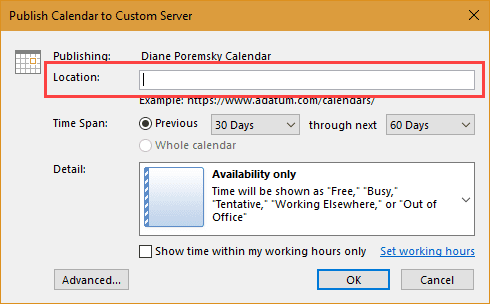
If you don't have a WebDAV server, you can still publish a calendar in agenda format to the internet using Outlook's built in feature to send a calendar by email. After generating the message, save the email as an HTML page and upload to the web server.
Outlook Calendar Template for Word
Use the Outlook Calendar Template for Word, then File | Save as HTML. Since the function that builds the calendar from your Outlook appointments is all in VBA, you can potentially customize it to create exactly the type of calendar you want. (HINT: Look at the Insertappointment subroutine.) See More on the Outlook Calendar Template.
My Outlook Calendar Template
Use My Outlook Calendar, then File | Save as HTML. This is a Word template, but enhanced with the ability to customize color-coding, date/time formats, calendar title, etc.
Tools in the Spotlight
Gives managers, secretaries and co-workers an instant, web-based view of where people are, what they are doing, and when they are next available. AgendaX will seamlessly manage multiple time zones and allow global views of staff availability and resource allocation. AgendaX incorporates many features that allow you to take advantage of Outlook calendaring, Active Directory attributes and web views to give you the ultimate corporate resource portal. No client installation necessary and nothing is installed on Exchange Server. Supports all Exchange Server versions. New Version 6 available now! |

Tools
Exchange Central is a group scheduling tool for Outlook users who are organizing employees, meeting rooms, company vehicles or any other type of resources in Outlook. Features include: team oriented views providing the user with an overview of many calendars, the ability to control and manage many calendars in one view, book employees and resources and move or copy appointments between calendars with drag and drop functionality. Exchange Central supports Office 365/Exchange Onlione. | |
The iCal add-in gives Outlook users the ability to subscribe to iCal calendar feeds. It supports the iCalendar open standard when receiving appointment and to-do information. Loaded with features including user-selectable update frequency on individual calendars, user-selectable Outlook folder location on a per calendar basis, and optional removal of Alarms and to-do items. Version 2.2.1. iCal for MS Outlook 2 runs on Windows 98SE, ME, 2000, XP, or 2003 and requires Microsoft Outlook 2000, XP (2002), 2003 or 2007. | |
MS Outlook ICS and VCF Adapter is a set of VBA scripts that enables a user to connect any Calendar folder (appointments or tasks) to a remote iCalendar server in read/write mode (i.e. it is possible to read from the remote calendar and it is possible to publish to the remote calendar. Free. | |
Web-based group calendar view running as .asp pages on Exchange 2000. Shows free/busy time and appointment details. Managers can create new appointments for users from the web view using Outlook Web Access. | |
WebTeam Central - the web based team calendar for Outlook and Exchange - offers even better opportunities for increased productivity and improved customer service. WebTeam Central gathers the appointments from Outlook calendars and gives companies and users the ability to collaborate regardless of the whereabouts of the individual user. The features are utilized through an Internet connection and a browser - fully compliant with Microsoft Outlook and Outlook Web Access. | |
VBScript sample for a yearly planner style calendar. It reads your default Outlook calendar and creates a HTML calendar. Displays all your Outlook appointments (longer than 0 minutes) for a number of months (you choose which) on one page. Formats include 1 month per column, 1 month per row, or 7 days. Supports up to 12 months. |
Outlook Web Access
Outlook on the web (OWA) allows any client with a compatible browser to access Exchange Server folders. Office 365, Outlook.com, and on-prem Exchange support sharing calendar using Outlook on the web. Office 365 and on-prem Exchange administrators can limit who you can share with.
Exchange Server Links
You can add a hyperlink such as
Outlook://Public Folders/All Public Folders/Meeting Calendar
to your HTML document (replacing spaces with %25%20 if your HTML editor doesn't do that for you.) For those with the right permissions, the calendar opens in Outlook (not in a Web page) in the last view that was used on it.
If the calendar is in a mailbox rather than a public folder, create a .xnk shortcut to that folder, save that shortcut on a network drive and make a file:// link to it in your HTML page. See Outlook Links for more information.

Janel says
Need help! I published my outlook calendar online through my webmail, use exchange server but work for a state agency. An outside colleague downloaded the link onto her outlook on her Mac and now has my calendar on hers completely! She can see ALL my details and her calendar has seemed to disappear. I have stopped publishing the calendar and we have deleted the download but nothing is working. How can my calendar go away on her computer and restore hers back on her computer??
Diane Poremsky says
Did she delete your calendar from her outlook?
Do you know which outlook version she is using?
Janel says
Version of outlook is 16-13-1 which I believe is the most recent version on her Mac. It seems as if my calendar repopulated over hers and my calendar does not even show up to delete in the left hand column. She downloaded the link and it default opened to ical but she forced it to open in her outlook. She has removed the download file and extension and trashed it. And nothing has changed!!!???
Steve says
HI, I would like to inlude a link in my SharePoint intranet so that a user can click on this link to open a new Outlook 2016 meeting invite for a resource calendar. Can you tell me if this is possible please?
Diane Poremsky says
Do you want something like a mailto link, but for a meeting request with a specific resource calendar selected or just the calendar accessible in sharepoint in an owa-like interface?
Harold says
I'm having a hard time publishing a calendar using MS Outlook 2016. It's asking for a WEBDAV server and my web hosting company is ipage.com. I was told that I have to use filezilla at one point. I don't know what to do. Any thoughts?
Diane Poremsky says
if you don't use Office 365, Outlook.com, or an Exchange server with publishing enabled, you need to have a WebDAV server to publish to. It's supported by both iis and Linux servers but not all hosts enable it. It would probably be easier to use outlook.com than to set up your own WebDAV server, if you host doesn't support it.