This frequent request comes from users looking for a way to send out meeting requests for training sessions or benefits meetings with HR, where each employee can pick the session that fits their schedule.
I was wondering if anybody can tell me whether or not this is possible, and if it is, how would I do so? We are going to have about six different meetings scheduled soon. We therefore need to send an invitation out to a group of people for those meetings. However, each of them only needs to select one of the six meetings. Is there any way to send a calendar invite that will allow them to choose one of the six meetings and thereby automatically update the sender's calendar AND the responders calendar?
Unfortunately Outlook doesn't have the capability for creating this type of meeting request, but you can do nearly the same thing by creating the meetings in the calendar, then send the invitees a message with each of the meetings attached and instructions to choose the meeting they want to attend.
Create the Request in Outlook 2013 and newer
These are the steps to create the meeting request in Outlook 2013 and newer.
- Create the invitations and invite required attendees, resources or yourself. The recipients will see original invitees. If you don't want them to see some invitees, add those recipients after you send it (either Forward each meeting individually or update the meeting before anyone accepts).
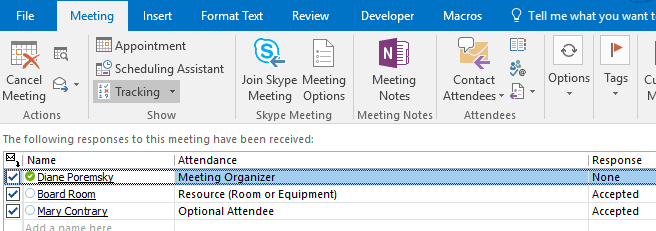
- Click Send. This step is important since you need a meeting request that was sent, so the responses can be tracked.
- Use Ctrl+click to select each meeting item on your calendar.
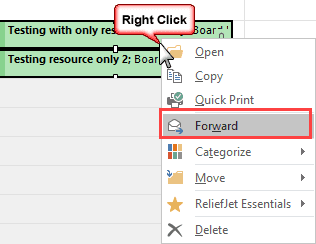
- Right-click and choose Forward.

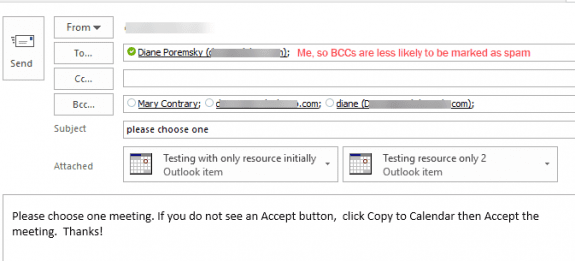
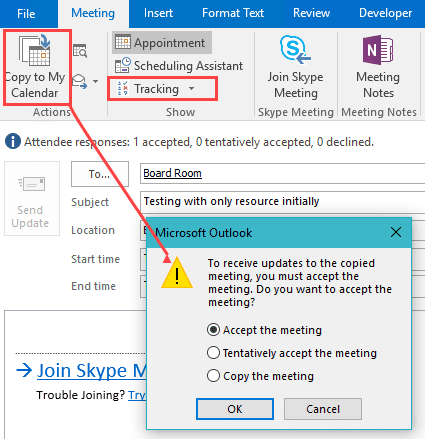
- In your message, tell the recipient to click Copy to Calendar to display a dialog to accept or copy to calendar, if they do not see Accept buttons.

- The recipient may see Copy to Calendar button. Clicking it will give them the option to Accept. They will also see who was invited initially and if they accepted before the meeting was forwarded.
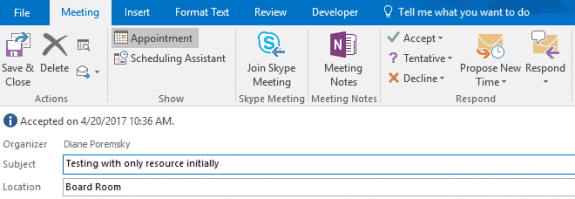
- When the recipients accept the meeting request, they'll send a response and the meeting is added to their calendar. At this point, it will look and act like a "normal" meeting they were invited to.
- The organizer's meeting will update with the recipient's name as an optional attendee.
Create the Request in Outlook 2010 and older
The steps are Create the meeting request in older versions of Outlook:
- Create the invitations and invite required attendees, resources or yourself.
- Click Send. This step is important since you need a meeting request that was sent, so the responses can be tracked.
- Open each item on your calendar select File, Save as.
- Save each item as an ICS on the hard drive.
- Create the email message and attach the ICS files.
- When the recipients accept the meeting request, they'll send a response and the meeting is added to their calendar.
- The sender's copy will update with the recipient's name as an optional attendee.
To avoid confusion, use the meeting date in the subject so the recipient only has to open the meeting they plan to attend.
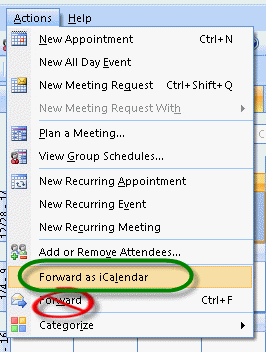
Save a step in Outlook 2010 and older: create all of the meeting invitations then select the meetings using Ctrl+Click. Use Actions, Forward as iCalendar to send. Don't right click and Forward, do not use Ctrl+F or Forward on the Actions menu.
Pick-A-Meeting Request Video Tutorial
This tutorial shows you how to send multiple meeting requests to someone so they can pick which meeting they will attend. The organizer's calendar will show who has accepted for each meeting. This video uses the long method, where the meetings are saved as icalendar files (*.ics).

William says
I run training programs and I want my employees to be able to select from a number of date and time options. I like to send them out in the message body of an email in a table listing the available dates and times. They can then click the icon and open their chosen meeting request then accept it. It looks better organized than all the meeting requests in the email as attachments.
The only way I've been able to do this is to switch my email to Rich Text, then schedule the Outlook meetings and send it to myself. Sometimes I add WebEx links to the meetings. Then open it again and click Forward as iCalendar. When the email pops up, the meeting request will be in the email body as an icon (not as an attachment). You can do this for several meetings and then click and drag the icons into a table placed in the body of one email message. The recipients may then select from your list, click the icon and have that meeting put on their Outlook calendar.
Remember to switch your email back to HTML.
Srini says
Can’t you copy the invite paste it (*.ics file) in the table as an icon? .ics will open up up the invite users will see accept/decline options.
Valerie says
When I forward the calendar options, and the user selects one calendar option, they can click on the 'Copy to Calendar' but it does not give them the option to 'Accept the meeting' invite. We need for them to 'accept the meeting' invite in the event we modify the date/time. Do you know why the ability to accept the meeting is not available?
Marla R Hill says
In the olden days, Outlook allowed you to offer choices via the scheduling assistant. This is an example of taking away a really useful tool and replacing it with something I probably haven't even tried yet.
Diane Poremsky says
I dont recall it offering choices to the people you were inviting. It had a feature that looked for the best dates available for everyone (whose Free/Busy you could see) - current versions have the same feature but the older method was easier to use IMHO.
LIR says
I am using Office 365 and having troubles.
1. It is not keeping the same format in my below notes sections (ex. the tabs are all over the place,
hyperlinks are as text, contacts code is showing)
2. I can not get an accept to show on the invite. When you click it says preview then you have to accept from there.
3. I can not designate the replies to go to another party aka my boss wants to see accepts and its coming to me.
I didnt have these problems until we switched to Outlook 2016 and Office360
Diane Poremsky says
1. Are you syncing with a smart phone? This can screw up formatted text in the meeting body. It should be ok with the Outlook app on the phone but can get messed up with the native apps.
2. If the recipient doesn't have the buttons along the top in Outlook, something was corrupted in the ivitation. If it's not properly previewing, check the preview settings (File, options, trust center - is preview turned on?) then Repair Office (in Control panel, programs and features).
3. File, Properties has the Have Replies sent to field if you need to redirect the responses. If you are setting these up on his calendar and you are his delegate, check the Delegate settings.
David Rose says
FindTime is a free AddIn for Outlook in Office 365
Jackie says
Hello - I was wondering if it is possible to create a pick-a-date option when you create on-line meeting invitations. We tried to go through the same steps but there was no option for the recipient to accept the invitation or add it to their calendar and maintain the message with the online meeting code & link.
Thanks for any help you coule provdie..
Diane Poremsky says
It worked for me (using outlook 2016/office 365 mailbox and the 'save a step' method' of selecting the meetings then clicking Forward) - but the copy the recipient got was the meeting invite with a copy to calendar button - after i clicked 'copy to calendar', i had the chance to accept it and the response came back with the account as optional. The 'experience' in how it worked from the inbox is not good IMHO.
using save as ics method then forwarding resulting in outlook 2016 thinking the person it was forwarded to was the organizer.
Diane Poremsky says
Heh... i can't follow my own instructions - i used right-click Forward with the shortcut method. :) It looks like right-click Forward is the best method, even if it is somewhat confusing on the recipient's side. (Include in the instructions to click copy to calendar then accept.) (I updated the instructions and included screenshots to use this method with outlook 2013/2016.)
indri says
When the recipients accept the meeting request, there are no button to click "Accept" or "Decline"......the option is only "Save & Close". Yes, they can add the meeting into their Calendar, however the sender can't do the tracking.
Any advise why this happened ?
Diane Poremsky says
Sounds like it wasn't sent as a meeting - this could be because you missed a step or due to something beyond your control (mail server, security scanner, or their mail client messed it up).
Buck says
One significant limitation to this method is the meeting organizer's inability to cap each session. So if I have 50 people I need to attend one of the three sessions but my room only holds up to 20 people, I would like to be able to cap each session at no more than 20 people.
Caroline says
I have used this method to my great joy and relief, as it did exactly what I needed it to do. Now, however, the ability to save a file as .ics is gone from the corporate Exchange. Is there a way to get it back -- or another way to accomplish the same task?
Diane Poremsky says
Are you using Outlook on windows or outlook on the web? Outlook can still save as ics unless your admins disabled it. (I can still save ics in my exchange online account).
Jay says
Hi Diane,
I tried this process, Works as expected via base client. I found that I did not get acceptance response when a it was accepted via OWA or Via phone.. Any suggestion on how to fix that ?
C Watling says
Hi, Can you set a limit to the number of employees that accept one from a multiple of meetings? As we only have limited space available. We don't want all employees accepting the same one.
Thanks
Diane Poremsky says
There isn't any way to do this built in to Outlook, but i have a macro that can limit meeting size.
https://www.slipstick.com/developer/code-samples/close-meeting-room-full/
C Watling says
Thanks Diane. That's much appreciated.
Laura says
When I send all different invites to the person in the email and they accept one it automatically adds the rest of the scheduled appointments to their calendar. What am I doing wrong?
Diane Poremsky says
are they opening all of the meeting attachments or just one? They should only open the one they plan to accept. Just opening it shouldn't add it to the calendar (they'd need to save it) but it can depend on their version of Outlook (or calendaring program) and configuration.
Anne Cousins says
This is great, however I need to give people over 10 date options. I have seen it done before, where each of the invites were inserted into a table to make it easier for the recipients to select their preferred invite option. Are you aware or can you explain how to do this please?
Diane Poremsky says
Were they using outlook meeting requests or links to a webpage to record their choices? If the message is going to internal addresses you can create a table in an RTF formatted message.
robin says
I tried this with a test and it worked great. However....I received Acceptance notifications in my email. I will be setting up 6 meetings that 125 people can choose from. They can choose all or 1. I can't have their accept notification in my in box. Is there a way I can turn that off but still have them recorded as meeting attendees?
Diane Poremsky says
the acceptences will come into the inbox but they should autoprocess, if you have that enabled in options. After processing, outlook can move or delete - look in file, options, mail - look in the tracking section near the bottom. The autoprocess and update options should be selected.
Vicki Grant says
I tried a test run with a co-worker of mine. She accepted the meeting but when I looked at the Tracking Status on my calendar it did not show accepted. It just said none.
Diane Poremsky says
Did you get a meeting acceptance back from her?
Chip Griswold III says
I used this today to send invitations to over 50 people - this is terrific. Thank you!
Troy says
Hi Diane, if I create a calendar invite for 3 meetings and invite all the reciepts, wont all the recipients have a pending invite in their calendar for all 3 meetings?
Thanks for your help!
Diane Poremsky says
No, not if you use the method here to attach all three to an email message. Only the one they open and accept will be added to their calendar.
Lucy Hughes says
Hi there, in the video tutorial you say to create the three invitations, add the recipients and click on Send. If I do that then my invitees will receive three separate invitations before I even have time to create my e-mail using the .ics files. I tried creating the three, putting the addresses of the invitees and then clicking on "Save but don't send". But even though my guinea-pigs accepted only one invitation of the three .ics and it appeared oK in their calendar I can't see in mine who's accepted because the tracking status button hasn't appeared yet (I guess it thinks it's impossible to track status if I haven't sent it yet).
Thanks so much for your help - it's really useful!!
Diane Poremsky says
On this: add the recipients and click on Send.
You need to add required recipients to it and send because in order for it to work, you need to send it to someone. If there are no required recipients, send it to yourself, but it must be sent.
Julie says
Thats what happened when I tried it, everyone got all the invites and sat as pending in their e mail...what did I miss here
Diane Poremsky says
You need to save the meetings as ics files then send them as 3 attachments on one message.
Kari says
Has anyone had problems with replies not being received from Mac users? I've posted a couple of times and haven't had a response from Diane. I would love to hear if anyone has had the same experience and if you've been able to resolve it. Thanks!
cgs says
I have reports today of mac users who said the invitation was difficult to respond too--could not see the data on the invitation so didn't know which one she was responding too. I am looking for resolution, too.
Kari says
Hi Diane, have you had a chance to do your test using your mac? If so, could you please provide me the results? Our training department sends invites to 500+ people and they are not receiving the replies from anyone using a mac. Thanks very much for your help!
Diane Poremsky says
I've tested it and can't repro but I have seen a few complaints about it. I don't know if it's the same problem as yours though.
Kari says
This method has been so helpful for us! The only issue we've experienced is replies are not being received from our Mac users. Is that expected, or is there a way to receive those replies, as well?
Diane Poremsky says
I believe it's a limitation of the method and certain mail clients - I will double check it on my mac.
Marina M says
Hello,
This is great information. Thank you. However, I have one more question. Is there a way I can block the time and date someone has selected if I can only meet with one person at a time?
Diane Poremsky says
No, I don't know of a way to do that. If they were creating the meeting and sending you an invite you obviously could, but once you send the invite, you can't block them. What you really need is a web service where you can limit the appointments and they can see the slots that haven't been booked yet.
junesiew says
That's helpful. Is there a chance to set the maximum number of participants for a meeting? For example, I need to have mix of 1 director, 1 VP and 1 senior manager in the meeting.
Diane Poremsky says
No, sorry, I haven't found a way to do that - it's not something that is supported by Outlook or Exchange, even though Exchange has a capacity field for Room mailboxes.
Maria says
I'm unable to track responses--is this par for the course? thanks
Diane Poremsky says
If the meeting is not in the default calendar, you'll need to update the tracking yourself. Otherwise, tracking should automatically update most of the time - some email clients don't return a response that outlook can decipher so those will need to be updated manually too.
NeedToKnow says
When I grab the 2 or more meeting request from my calendar as shown in the video, I go to ACTIONS>FORWARD as ICalendar, only the first meeting request is added to email--how can i grab all? thanks
Diane Poremsky says
Hmm. It looks like it's broken. :( You'll need to save the them as ics files then attach or use forward as ical to open each meeting in a new message, then drag the ics attachments to one message.
Simon O'Keeffe says
Hi Diane. Correct. When I use Doodle, I cannot see in my Outlook who booked the slot, which makes it pretty useless. Doodle's customer support's answer is look up the website or the app, which does not suit me.
Thank you for your suggestion that I check out ScheduleOnce, It looks like it will do what I want.
Simon
Simon O'Keeffe says
Hi Diane, I have a Doodle subscription. I'm trying to persuade Doodle to alter things such that my calendar shows WHO has picked what slot. At the moment all it shows me is that a slot has been picked. Entirely unsatisfactory!
Diane Poremsky says
so who picked the slot doesn't sync down to outlook when you use doodle? scheduleonce syncs a meeting require. i forget what timetrade does - it's been awhile since i switched to scheduleonce.
Simon O'Keeffe says
Hi Diane, in my case I need to schedule a series of one-to-one, private meetings with our enterprise acceleration center clients (start-ups).
What I want to do is to say to them: "I will be doing a series of one-to-one, private meetings in half-hour slots starting at 12:30 on Thursday. Slots will be allocated on a first-to-reserve-first-served basis. Please pick your slot now. if your preferred slot is already taken, you will be offered the next available slot".
Is this possible with a variation on the valuable advice you've provided above?
Diane Poremsky says
No, Outlook can't do that. A scheduling service would be better for this. (scheduleonce, timetrade, doodle are some of the services).
Bob says
Could you do this by using your macro and limiting each meeting to 1 person? If you have 50 users/meetings, would all 50 users then have to be sent 50 invites?
fahas says
Could you share the .xls file pls
Elizabeth says
I followed the instructions, but instead of attaching it to an email, I created hyperlinks in an Excel sheet so the user can see a grid of all the available times. Everything works great, the only problem is that the person who accepts the invitation can't see who else has accepted. The organizer can see everyone who has accepted, but the users can't even see his/herself as an attendee even though it is on their calendar. Is there a way for everyone to see who all will be at that meeting?
Diane Poremsky says
That's a cool idea.
No, the attendee list is only visible to the organizer and people who have permission to see the organizer's calendar.
Peggy says
Since I was sending the invitations to over 900 people, I had unclicked 'request responses.' That is why they weren't receiving any updates. To fix the problem, I allow responses but created a filter which puts all of the responses into a seaparate folder. Wa La! Thank you.
Diane Poremsky says
Ah. Thanks for the update. I don't think I would have thought of that.
Peggy says
Thank you for this information. Unfortunately, if I send out the .ics invitations via an email as stated above and I have to cancel or revise the original invitations on my calendar, those accepting the separate invites do not receive the updates or cancelations. Is the only way to let everyone know of the change to cancel via a regular email message, then they delete it manually from their calendars? If yes, I guess I then just resend an email with revised .ics invitations attached. Correct?
Diane Poremsky says
They should get updates, but if not, then yes, the only way to notify them is by sending a new message or a new meeting request.
Sam says
Is there a way send multiple meetings to a group and have a cap when a certain number accept. For example: I invite 80 people to 2 meetings but only have space for 40. After the 40 slots fill up the only other option would be the other meeting time?
Diane Poremsky says
No, unfortunately, there is not. There is no way to do this built into Outlook. I tried using VBA to track it but my attempts failed. That's no guarantee that it can't be done, but it's not going to be a simple macro.
Hira says
Hi Diane,
I'm using Outlook 2010.
When I open the meeting requests and click on Tracking, I only see myself as the attendee probably because I put my name there and saved it before sending the meeting requests to everyone.
The only way I'm able to see who'll be attending is when I get 'accepted' notifications in my inbox.
Any suggestions/ advice?
Many thanks.
Hira
Diane Poremsky says
Right, that is how it works. You can't add the invitees to the appointment without sending updates.
Hira says
Hi Diane,
Thanks for sharing this. I followed all steps from 1-6 just like you advised. First I sent all the meeting invites to myself and then saved the ics files in my hard drive. After this, I attached them in an e-mail. But I'm unable to see the names of people who've accepted the meeting in my calendar eventhough I am geeting accepted notifications in my inbox.
I'd really appreciate your help in understanding how to be able to see how many people have accepted the meeting request(s).
Thanks,
Hira
Diane Poremsky says
What version of Outlook do you use? Their names should be on the tracking tab (and were, the last time I tested this.)
michelle says
Is there a way to track the acceptance of the forwarded icalendar?
Diane Poremsky says
A response should come back to the appointment owner when its accepted or declined, but there are a number of things that can go wrong, so you won't always get the update.
nick says
great stuff thanks...is there a way a recipient can pick multiple choices of meetings? I'm thinking as in Google Poll, that way the person organizing the meeting can see everyone's availability for all choices
thx
nick
Diane Poremsky says
When you use this method, they could accept any or all - that is about the only way.
jim says
I think people may have a problem with setting appointments vs. setting meetings. This worked for me (you'll notice I poached a couple of items). I'm working in Outlook 2010:
This is a nice way ask recipients to choose among multiple meeting choices. Another benefit is if that recipient wants to change their mind at a later date, they simply need to delete the meeting from their calendar and pick another choice from your original e-mail:
1. Make two (or more) new Meeting Requests in your calendar (don’t make Appointments, which is the default if you double-click on your calendar). You can do this by right-clicking on your calendar itself and choose “New Meeting Request” or by clicking on the “New Meeting” icon. Invite only yourself (or others that you need in attendance at ALL of these meetings) and any other Rooms or Resources that you will need to reserve. Click “Send” after you make each one, remembering that this will only go to you (and reserve the Rooms and/or Resources).
2. With the meeting invites now on your calendar, open each one of them and choose “Save As” and choose the default iCalendar Format (*.ics) and save to a location of your choice. You don’t need to “Send Update”, just X out. Do this for all the meeting invites you just made.
3. With all of these meeting invites now saved, open up a new e-mail and attached these meeting invites as attachments. Give your recipients instructions to choose one of the meeting invites by double clicking on it and choosing “Accept”.
4. Tip: Consider making the Subject line of the meeting include a date and time. This will make the recipients’ choice easier.
Lonna McHugh says
It would be to co-workers email addresses.
Diane Poremsky says
I'll have to test this and see if i can figure out what is going wrong.
Lonna McHugh says
I did just as the Oct 2012 video instructed(I think). I created both meetings on the public calendar. Then I forwarded the first mtg as ical, then the second as ical and copied it onto the first ical email. Still no accept button to the attendees.Don't know what I am doing wrong. Your help is greatly appreciated because I love this feature.
Thanks,
Lonna
Diane Poremsky says
Are you sending the invitations to Internet addresses or coworkers? It sounds like the TNEF data might be getting removed.
Lonna says
I have 2010 and can not get this to work. My receipients do not have the accept button. I probably am doing something wrong...Help, Please! Thanks,
Lonna
Diane Poremsky says
Did you create a meeting request and send it to the required attendees or yourself? The meeting request needs to be sent ot save properly.
Megan Hathaway says
I've seen it done where people have the meetings as multiple icons in one email, not just multiple attachments...how can I embed the meeting invite in the email as an icon?
Diane Poremsky says
The email message would be set to use RTF format. Just make sure its only going to Outlook users - it's the only mail program that can read RTF email.
Lynn says
Per the video, if you have to send the meeting notices out to required attendees in step 1, everyone's going to get multiple meeting invites. You've done what you're trying to avoid. Why would I then send icalendars out to them again? Sorry - this doesn't make sense.
Diane Poremsky says
You send the meeting to yourself (or required attendees) so the meeting is on your calendar. With it on your calendar, you can now forward the meetings to the invitees to pick the date they want to attend.
Frohberg says
Thank you very much.
Kind regards
J. Frohberg
Frohberg says
Right now I#M using *.xls (Excel 2003). Basically, it would be possible to use a different format, but concerning usability Excel is best at handling the input of lots of data.
Kind regards
J. Frohberg
Diane Poremsky says
I'll see if i can come up with something.
J. Frohberg says
Dear Diane,
Thank you for your guide. It is really helpful, but I have a problem (Outlook 2003):
Everything works fine as long as I'm creating Meetings in Outlook and send them via ics to recipients. My problem is that I have a huge list of meetings which I'm importing to outlook. Unfortunately, these events show up as appointments. I can manually change them to meeting by inviting i.e. myself but as soon as I save this meeting I can't send it anymore via *.ics.
It says "Error while executing operation".
First of all, is there a clean way to import meetings into outlook?
And second, what's this error supposed to mean?
I would thank you very much for any assistance concerning this problem.
Kind regards
J. Frohberg
Diane Poremsky says
What format are the meetings in before you import, eg, CSV, a pst file etc.
sarah hoke says
I cannot get this to work in Outlook 2010. I see on the tutorial that it looks like you may still be using XP. Do you have any updates for Office 2010?
Diane Poremsky says
For now, right click after selecting the items and choose Forward.Forget that - it's sending the messages a meeting drafts rather than invites.Forward as iCal is only sending one selected item in Outlook 2010 - might need to use that then drag all of the icals to one message.
Diane Poremsky says
Here is a quickie video while i look for a better way to do it.
https://www.screencast.com/t/RqDHpnRk
John says
I can't get this to work in Outlook 2007; the "Accept" button is not available after clicking on the file
Mimi says
Thank you thank you thank youuuuuu ! Very helpful !!
Dara says
Thanks for the tutorial. I've been using forward as iCalendar in Outlook 2003 with great success, but recently my organization has transitioned to Outlook 2010. Now, most 2010 users are telling me the icons don't work any more! We've found a work around by saving the ics file to the user's desktop, then having them open it from there, but that's a cumbersome way to deal with it. What am I doing wrong?
Thank you Diane!
linda cowper says
this tutorial is great - it showed a simple method of offering multiple meeting dates within one meeting request/email. Thank you Diane!
Trevor says
This was SO helpful! I searched everywhere for how to do this. Thanks!