After creating a custom form, how do you save and use it?
You have two choices: you can use the File, Save as menu and choose Save as template (*.oft) in the file system or Publish it to a folder in your mailbox.
Which method you choose depends on the form.
Save as Templates in the file system
Simple forms can be saved as templates anywhere on the drive. You can double click to open them or copy them to a folder in Outlook for easy access.
Forms with custom fields need to be saved in the default Templates folder and opened using the Choose Form dialog. See How to Open Outlook Templates using Toolbar Buttons if you want to create a toolbar or ribbon button to open these forms.
Published Forms
Forms with code behind them need to be published. Instructions to publish forms and delete republished forms follow.
Publish A Custom Form | How to Delete a Published Form
Version the form
Before publishing (or republishing) a form you should enter a version number on the Properties page. Each time you republish the form, increment the number (usually in 1.2 format, but it's your form and you can use whole numbers, if desired.)
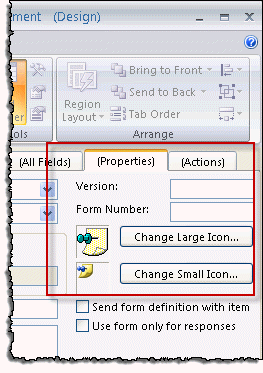
You can also change the icon. The default forms icons are stored under the FORMS folder in your Office installation; by default it's C:\Program Files\Microsoft Office\OfficeXX\FORMS\[lang-id].
Publish the form
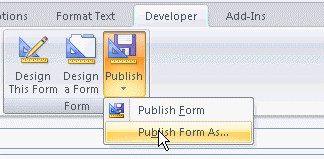
To publish a form using Outlook 2007 and up, select Publish on the Developer ribbon. If you are publishing a new form for the first time, either Publish or Publish Form As will do. Use Publish Form As if you want to publish a custom form using a new name.
Enter a name for your form. You can use spaces in the name, however I prefer not to.
The default location for non-mail forms is Outlook Folders. This saves the form in the default folder for the item type. You can choose another folder (of the same type), if desired. When forms are published to the folder, you can select them from the Actions menu (older versions) or from the New Items > Custom Forms button.
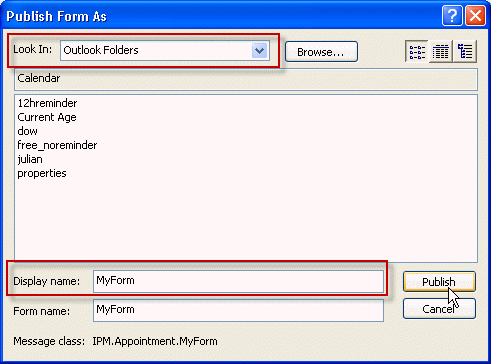
After publishing, the form is installed and ready to use.
Save as or Install *.FDM
While users of any version of Outlook can save, publish, or share custom forms as FDM files, most people will share custom forms as template files (*.oft). However, a bug in Outlook 2013 prevents users from saving some custom forms as templates (*.oft). In order to save a custom form in Outlook 2013, you need to publish it then save the published form as *.fdm file.
To save the published form as a FDM file, open the File, Options dialog, Advanced, and click the Custom Forms button, then Manage Forms. Locate the form you want to save, select it and click Save as.
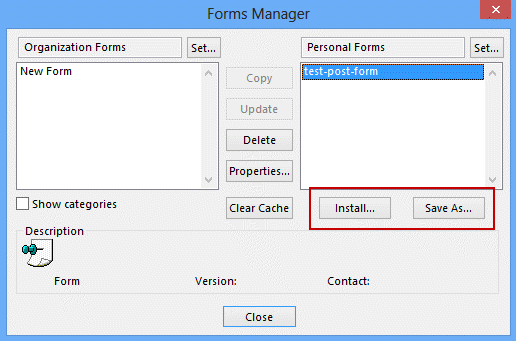
Repeat the steps to install a form: open File, Options, Advanced. Click on Custom Forms, then Manage Forms. Click Install then browse for the form.
Note: some forms will need to be in the default *.fdm location, %localappdata%\microsoft\outlook, to install.
While this is a few more steps than are necessary when you use a template, Outlook 2013 users can use this method to save custom forms to an Exchange server's Organizational Forms Library, as the Organizational Forms Library is not available as a Publish to location in Outlook 2013.
Published form locations
Outlook forms can be published to three different types of form "libraries":
- Personal Forms Library of forms stored in your Personal Folders or Exchange Server mailbox.
- Organizational Forms Library of forms stored on the Exchange Server for group use. You need permission from the Exchange Server administrator to publish to this library.
- Folder Forms Library of forms associated with a particular folder, either in your mailbox or Personal Folders or in a public folder on the Exchange Server.
When a form is published to a folder, it's listed on the Actions menu when you are using that folder. To use the form, click on Actions, <form name>
Remove a Custom Form
To remove a published form in Outlook 2010 and up, choose File > Options > Advanced > Custom Forms > Manage Forms to access the Forms Manager dialog.
In Outlook 2007, 2003 or 2002 choose Tools > Options > Other tab > Advanced Options > Custom Forms > Manage Forms and use the Forms Manager that pops up.
Click the Set button and select the location where the form is published. Select the form and click Delete.
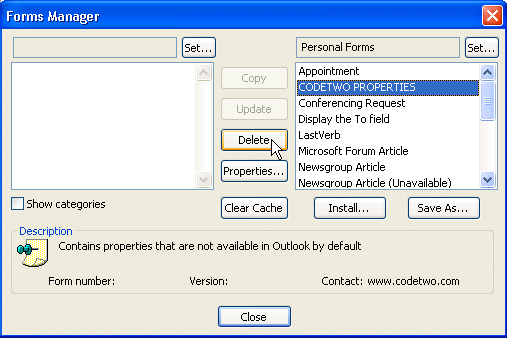
In Outlook 2000 or 98, choose Tools > Options > Manage Forms, and use the Forms Manager that pops up. (In Outlook 98 or Outlook 2000, this function is not available in Internet Mail Only mode, only in Corporate/Workgroup mode.)
Publish forms video tutorial
More Information
For more information on distributing forms, see How do I distribute Outlook forms to other users?

Anis says
Hi, I am not an expert in outlook, I want to know please how can i create a mailbox with a question that includes different criteria and the answer must be Yes or No. Like the invitation request to a meeting but the question is different. I really need to solve this, please help. My mail is anisbelkhir@gmail.com, if you can detail the process to be done or send a video explaining the steps, I would be so grateful! Thank you.
Ileana Mendoza says
Can I set up a form so that is the only option in a specific email account? So when the user opens up outlook 2013 mailbox this form will open by default.
Diane Poremsky says
For email? No. You'd need to use a macro. You can set custom forms for calendar and contacts that are specific to specific folders.
sandeep says
Hi i created one Custom Form in outlook 16 under Appoinments
p.2 in windows 7 ,but when i publish it and Installed it on windows 10 outlook 16 .the script not running i have added logic in drop down select but not able to find out why its, I done everything this in Trust Center Enable script and others steps too. can anyone please help me to do this
Mick says
I have saved multiple forms as templates for our department but some messages have the right subject line but wrong body. We have over 20 templates and about 6 are doing this; all have the same body but the correct subject line. any idea what is causing this?
Jayce says
We have a knowledge base published on an http website. The pages have links on them for the OFT templates. Clicking the link launches the template as an .msg in outlook 2013.
The problem we are having is the "From" field changes to the default account instead of the shared account/desired mailbox. In the From field on the OFT template when published, it has the shared mailbox email address,not the display name. All analysts that launch the http link have the shared mailbox added as an account in their outlook profiles.
Is there way to keep the From field in the template when launched from http links?
Diane Poremsky says
The only way that ever worked was saving it with the same display name as used in the profile. For a shared mailbox, this would be the display name,not email address.
Fran Riley says
I have used Developer in Outlook 2010 to create a template for use on my manager's calendar. With the upgrade to 2013, when I try to use the template it has changed the organizer to me and puts the appointment on my calendar instead of my manager. Something has changed in going to 2013 but I can't figure out what. An suggestions?
Diane Poremsky says
You set the from field to be the manager in the template? Is the account name (as it appears in outlook) the same? That is usually the cause of forms with preselected accounts no longer working.
Older versions of Outlook used the display name for the account name, outlook 2013/2016 default to the email address.
Fran Riley says
Thanks for your very quick response.
I did not set the 'from' field. I don't use Design A Form. Can I 'set the from' in creating a meeting? I had created the meeting on my manager's calendar and as with other meetings not saved as a form - my manager was listed as the meeting 'organizer.' It is only after I Published the form was I listed as the organizer - not my manager - and when sent, the meeting then hopped to my calendar. I have recreated the form, Publishing with a different name, placing it in my Personal Forms Library - with the same result.
I don't understand your question: "Is the account name (as it appears in Outlook) the same. All the names, including the addressees appear as their display names - not Jane.Doe@acme.com.
Diane Poremsky says
>> I don't understand your question: "Is the account name (as it appears in Outlook) the same. All the names, including the addressees appear as their display names - not Jane.Doe@acme.com.
in some versions of outlook it is display names, newer versions use email address (but upgrading in place keeps it the way it was). if you save a form with an account name set and that account name doesn't exist in the profile, it uses the default account.
I will see if i can repro and come up with a solution.
kristy amar says
We work in Outlook 2013 and have loaded a custom form to the Organizational Forms library but it will not let us Publish it. What might we be doing wrong?
Diane Poremsky says
It's a bug (or a product change) - you need to save as a form and install it.
https://www.slipstick.com/developer/publishing-custom-forms/#fdm
Marko says
we have forms saved in Organisational form Library on exchange server - when we modify/change the form after republishing it those changes aren't saved. not on the Compose page and not on the read page in developer mode. Any idea why?
Tony says
One aspect of custom forms that has always frustrated me is that when publishing the form, it appears to lock the body format. So even if you change the default body format via "Compose messages in this format:", the form will always use the format that it was published in.
You can still change the body format using the Format Text options from within the Inspector Ribbon, but your configured default is ignored.
If the custom form was in HTML during creation and you publish it, every time you compose a message with that form the body format is always HTML.
If the custom form was in Plain Text during creation and you publish it, every time you compose a message with that form the body format is always Plain Text.
If the custom form was in RTF during creation and you publish it, every time you compose a message with that form the body format is always RTF.
This has been a problem since Outlook 2007, and it still a problem in Outlook 2016. The only solution is to create the form as an .oft file using Outlook 2003.
Unless there is another solution that I am unaware of?
Diane Poremsky says
Correct - the format is set when you publish the form. You can change it manually, use and oft, or put code behind the form to change it on open.
Emily says
I want to delete a custom form I've published, that I have published in "inbox" not "Personal Forms Library".
When I go to delete the form from: options/advanced/custom forms/manage forms it doesn't give me an option to delete from "Inbox", only "Personal Forms Library" where it is not saved, thus have no option to delete.
Any information you can provide on where I can find this form to delete, would be appreciated.
Thanks!
Diane Poremsky says
Is there a Set button? Click it then select the inbox folder.

Steve Mills says
I have an outlook custom form developed under outlook 2010 but we have recently migrated to office 365 (cloud) and the code no longer runs. I can publish visual changes to the form but none of the code runs. what did I do wrong? I tried the old way (publish the form to the folder which in a public folder). I tried the "Save as or Install *.FDM" method described above. NADA. Help?
Diane Poremsky says
In file, options, trust center under email security there are options for running script in public or shared folders. they need to be checked.
Wilkisa says
We have a custom form saved in our Organizational Forms Library. We fill in the blanks and hit the SEND FORM button that is built into form and it sends messages to everyone in IT. We want to create a second form that is used for different announcements so we have opened and designed this form and published as a different name in the same library. We changed who we are sending to and the name on the button but now it won't send. It prompts for us to choose from the Global Address Book even though the name is clearly displayed in the TO field. What happened? What did we miss?
Diane Poremsky says
does it have the name in the address field or an alias / email address? Was the name resolved (underlined)?
Alwin De Moor says
We are implementing an Organizational Forms Library and everything works fine except when we create a new appointment in a shared calendar. We want the user to select one of multiple possible appointments and have it appear immediately in the shared calendar (New items->More items->Choose form), but it is created in the user's calendar instead of the selected shared calendar. Is there a way to change this behavior? We don't want to cut->paste every time.
Diane Poremsky says
do appointments created with the default form use the shared calendar?
Mike G says
I have been trying to create a few custom templates for use with Outlook 2016\(Office 365) and I find that every time a make a change of any kind, this layout then becomes the default for all new emails. I have tried saving it as 'test.oft' in the templates folder in roaming etc but regardless of what the name or where I put it, the last email I save is then my default opening layout for each new email.
How can I get around this so that I can test various layouts without have to undo it all to get back to where the normal email is?
Diane Poremsky says
That's odd - you can't change the default form for mail but can set default stationery for new mail, but that doesn't use an oft file. What changes are you making to the layout that the new form is using? Some changes are saved globally (like the zoom level) and would apply to all new messages.
Lori A. says
I have published a custom form to a shared calendar. Now I have removed the published form from the Forms Manager. However, the defaults for the custom form being used every time I try to add a new appointment to the calendar. For example, when I add a new appointment (using the IPM.appointment form), it defaults to 2 days and 18 hours appointments. I want it back to one day and 30 minutes appointments. Any suggestions.
Seth S says
I am able to publish forms, however when the form is sent one of the fields (a combo box) deletes the information that was chosen through the drop down list. All other text fields come through but the drop down list field is blank for the recipient. Why would this happen?
Diane Poremsky says
How did you add the values to the field? Scripting would be blocked for sure, but some fields won't work unless the form is published or available locally.
BTW, if you are sending the form to internet addresses, you might be better off with another solution - custom forms work best in an organization using exchange (or office 365) where you can publish the form to an org form library.
Julie Morse says
Is there a way to set your Personal Forms Library as the default library in the dropdown box when you want to access forms? We store most of our forms in our Personal Forms Library but the dropdown always shows the Standard Forms Library and then we have to select the Personal Forms Library from the dropdown.
Diane Poremsky says
No, you can't change the default. You can use macros for easier access to the most used forms.
https://www.slipstick.com/outlook/hyperlink-templates/
Howell Strain says
We migrated an Organizational Forms library to Exchange 2013. With Outlook 2010 I can not update forms but must Publish As and overwrite. Is this normal?
Diane Poremsky says
If i understand the problem correctly, yes. Also, make sure you update the version number each time you publish/update. This will help to prevent forms corruption.
Bob Sullivan says
Hello Diane,
I've added my forms to my Personal forms Library. I've added the Choose Form button to the Quick Access. Is it possible to have the Personal Forms Library open by default (instead of the Outlook Forms Library) when you click on the Choose Form command button?
Thanks for your work!
Diane Poremsky says
No, you can't change it. Sorry.
Timo says
Is there a way to duplicate the default appointment form? All I want to do is add a 2nd location to the default form.
Diane Poremsky says
You would use the default form as the basis for the new form - but you can't edit the main page and would need to add it to page 2 (P.2). You can't have two location fields but you can add a custom text field for the second location.
You would be able to set it as the default form for new appointments.
Andrew says
I can't seem to save my custom form from forms manager, the save as button is greyed out. Any ideas?
Diane Poremsky says
What version of Outlook?
vijaycapri76 says
Hi Diane - I created a custom form in Outlook 2013 in-order for my client to fill in set of details (selecting values from drop down, radio buttons etc). I published this form under Personal Forms Library successfully. The form opens and sends successfully to myself (as a test) even when pre-filled. However, the email appears to be blank when others receive this form. They are not seeing anything in the form. I have tried enabling all options, macros etc but with no result.
Any help would be appreciated.
VJ
Diane Poremsky says
You need a read page (if you have separate pages enabled). You may also need to use RTF and send the forms definition.
tony says
Have you seen with the forms manager with personal forms where the Delete button is greyed out? Any good ideas on what is going on and how to actually delete some of those? I looked in the cache directory and notice not all of them are there compared to what is listed in the personal forms.
Tom says
Hi Diane. I have a custom form that was developed in Outlook 2000/2003. It has a problem in Outlook 2010 which means it no longer works as expected. The form runs a VBScript on opening to work out what 'state' it is in, this then determines which fields and controls are displayed. The first check the script does is to see if the form has already been opened (using Item.Unread). In 2000/2003 Item.Unread returns "True" the first time the form item is opened, but in 2010 it looks like Outlook changes the state to "False" before the code runs so the check always fails.
I realise this is a bit of a long-shot, but any help much appreciated!
Diane Poremsky says
Where is the form published? Is the script running? Scripts are blocked in some folder unless you enable them in Trust Center, Email Security.
Tom says
For the testing I'm doing I have published in my Personal Forms Library. The script is running, I've got message boxes to pop up showing me where it gets to. This is the section:
If Item.Unread Then
Item.userProperties.item("FormState") = conPartnerForApproval
Else
Item.userProperties.item("FormState") = conRequestorSentForView
End if
In 2010 it always goes to the 'Else', in 2003 it would go to the 'If' the first time the item was opened.
Thanks again.
dee says
Diane, I cannot seem to print out my custom form with the visual look that I designed. It prints out only the fields in a simple text file with the variables and the data next to those variable. Any way to print the form that looks like the way i designed it?
Diane Poremsky says
No, you can't print the look unless you use screen print. Outlook's built in printer templates use a simple design - text only (and embedded images, if in the notes field).
Erin says
Hi Diane,
I've created a basic form in Outlook 2010 and saved it as a .msg file. When I attach the .msg to an email so a co-worker can use the file, they see a blank page, with only the TO, CC and Subject line displayed. I've tried it with excluding a separate read page and with copying the content from the display page to the read page, and neither seems to work. Any help you could offer would be appreciated. Thank you.
Diane Poremsky says
Try saving it as a template (oft) and sending that to the coworker. They won't see the form unless you use forms definition, but its better to send the template and let them publish it.
Glenn Martin says
One last question. Is there a way to reorder the Org Form Libraries, or set a default library from within the Choose Form dialogue box? When I drop down the "Look in" field, I would like the Shared Mailbox library to show up first. Or at least move the Shared Mailbox library closer to top of the list. It's currently at the bottom. Thanks!
Diane Poremsky says
Sorry, no. That is an MRU list but its unsorted.
Glenn Martin says
Thanks Diane. This engagement might go a couple of different ways. Currently, the simplicity of auto-adding the shared mailbox to the profile is very enticing to the client. If that is offset by having people delete or modify the forms, they may reconsider. If we went with read only access to the shared mailbox, which is only there to house the org forms, do those permissions extend to the forms and prevent modifications/deletions? And are mailbox permissions the only way to manage permissions on the forms? Thanks again.
Diane Poremsky says
Yes, the folder permissions extend to the content in the folders. That would be the only way to manage them, yes.
Glenn Martin says
Hello Diane, I am moving some Org Forms from a 2003 Org Form Library, to a Shared Mailbox Org Library (the mailbox is on Exch2010). Is there a way for me to manage permissions to those forms? For example, I need to give a user full permission on the shared mailbox in order for them to add the mailbox to their profile. Is there a way for me to prevent them from modifying or deleting the forms in the shared mailbox library?
Diane Poremsky says
They have full permission so the mailbox is added automatically? you can give fewer permissions but they'd need to add the mailbox in Account settings > More Settings.