The steps you need to follow to leave POP3 email on the server depends on your version of Outlook.
In Outlook 2010 and newer, the default is to leave all mail on the server for 14 days. This change was made to prevent problems when people set up new accounts and wanted mail left on the server but opened Outlook before setting Outlook to leave mail on the server. Once it's downloaded by POP3, it usually can't be put back. See Restore POP3 Mail to Server for methods.
Outlook users who do not want mail left on the server for 14 days will need to go into More Settings and change it.
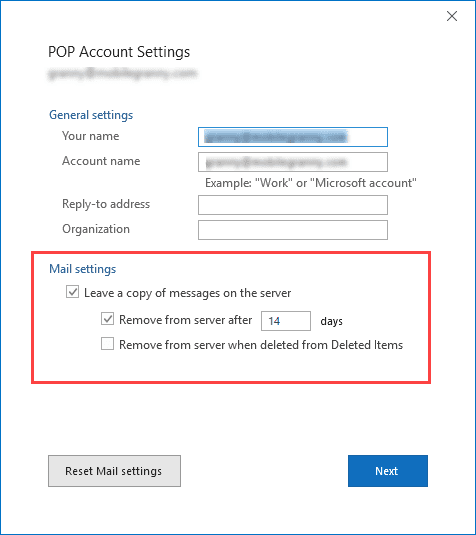
Outlook 2016's simplified account dialog
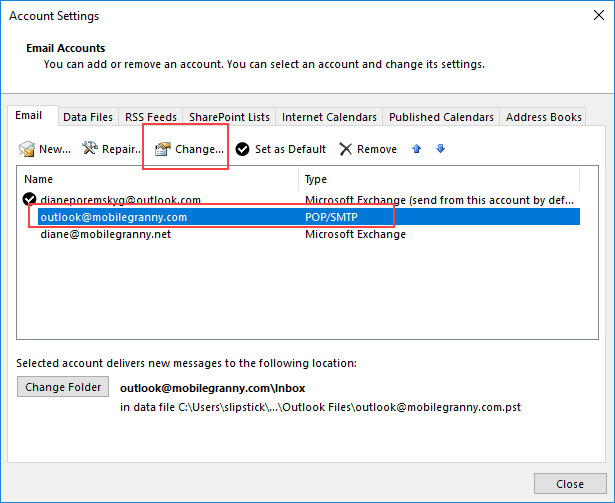
With Outlook 2016's simplified account dialog, the leave on server option is visible as soon as you open the account settings.
- Click on the File tab
- Click Account Settings button
- Double click on the POP3 account or select it and click Change

- Choose or change your Mail settings
To change the settings in Outlook 2010 and Outlook 2013
These steps also work with the older account dialog in Outlook 2016.
- Click on the File tab
- Click Account Settings button
- Double click on the POP3 account or select it and click Change
- Click More Settings
- Click on the Advanced tab
- Leave a copy of messages on the server settings at the bottom of the dialog.
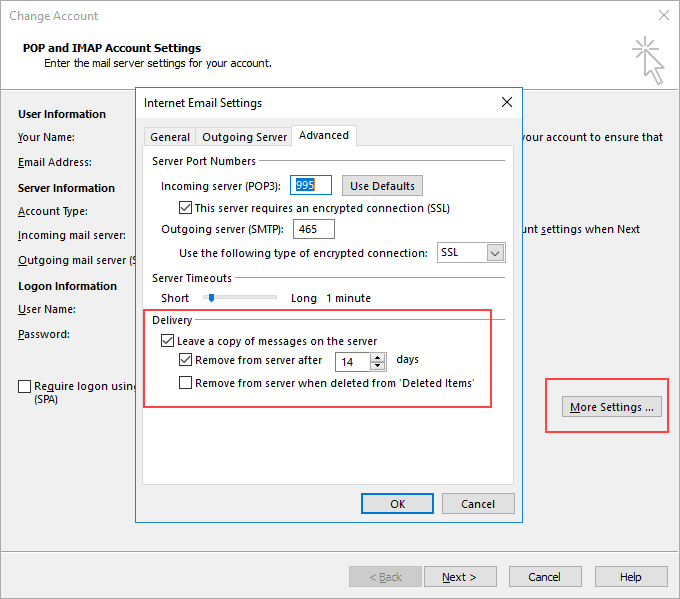
Only POP3 email can be left on the server or deleted. IMAP, Exchange server, and Outlook.com account types are server-based accounts and mail is always left on the server. If you want to delete the mail from the server with these account types you need to use rules to move your email to a local pst file.
The dialog is identical in all versions of Outlook. If your dialog does not look like the one below, verify your account is a POP3 email account. This option is only available for POP3 accounts.
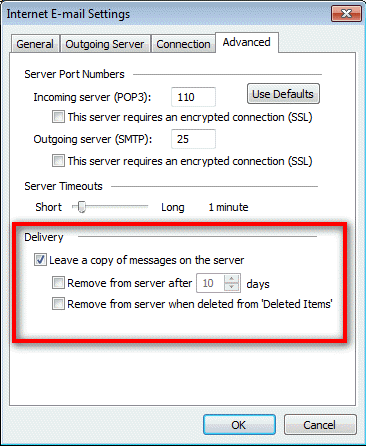
Outlook 2007
Go to Outlook 2007's Tools, Account Settings.
With the Account Settings dialog open, the steps are the same as Outlook 2010 and newer: select the account and click Change, then click More Settings. Look on the Advanced tab.
Outlook 2007 More Settings Tutorial
With the exception of the location of Account Settings command, the steps are the same for Outlook 2010 and newer.

elina robin says
To Leave Internet Messages on the Server
Joginder Singh says
get me error send & receive massage : the operation failed. An object cold not fund
Diane Poremsky says
What are you doing when you get that message?
Nicole Whitehead says
I need this for Outlook 2016, can you help????
Diane Poremsky says
The steps are the same as for the other versions - open File, Account settings. Double click on the account then More settings, Advanced tab.
Sue Churn says
Hi I have 2007 outlook and have recently been forced to IMAP by my ISP, how do I delete the message from the servier
Diane Poremsky says
you need to delete it from outlook or move it to a pst file then purge the folder.
https://www.outlook-tips.net/tips/outlook-imap-accounts/
Sky says
outlook 2016 dos not have this settings at all
Diane Poremsky says
It does, but the account needs to be set up as POP3. Auto account setup defaults to IMAP if it's supported by the server and imap always leaves mail on the server.
Bill Shanner says
Done this many times before but never on Win8 Outlook2013. My problem is the Internet E-mail settings dialog box just does not have the delivery section. Not sure what is wrong
Diane Poremsky says
What type of email account? Only POP3 accounts have the leave on server settings.
Bobbie says
There are no settings in the final box as stated above, using Outlook 2013....only has info pertaining to deleted messages and says nothing about "leave on server".
Diane Poremsky says
Are you using a POP3 or IMAP account? IMAP accounts always leave mail on the server.
James Tyree says
I have the same problem, "I change the setting to "leave the message on the server" but it won't stick. Have the same problem with my laptop. I'm running Windows 8 on both. What is the fix?
Diane Poremsky says
Are you using any registry cleaner or registry protection software?
Does it stick if you close Outlook and restart using Run as Administrator? Hold Ctrl+Shift as you right click on the Outlook shortcut to restart. After changing leave on server, you can restart Outlook normally.
Dan says
i have outlook 2007, i have changed the setting to 'leave the message on the server', the trouble is, every time i turn the computer off, or shut down outlook i loose the setting. how do i make it permanent.
Diane Poremsky says
So it won't stick if you close Outlook and restart it a few minutes later? That usually means that Outlook doesn't close 'cleanly' and the registry wasn't updated correctly.
T. Wooley says
Worked perfectly for me. A small button I had missed trying to do it on my own! Thank you!
A. Kennedy says
This answer in no way resembles what is on my Microsoft Outlook 2010. It is insufficient to properly answer the question. I would like to see a step by step answer as to where I find the settings. When I find following (as best I could) the instructions in this, I reached a screen that was not the same as the one shown above. Poor answer.
Diane Poremsky says
What type of email account do you use? Only POP3 accounts can leave mail on the server or delete it; all other account types are server-based and the only way to delete mail from the server is by moving it to a local pst or deleting it.
1: Click on File tab
2: Click on Account Settings
3: Double click on the POP3 account listing
4: Click More Settings
5: Select Advanced tab.
6: Leave on Server settings are at the bottom of the dialog.
The dialog is identical in all versions of Outlook. If you dialog does not look like the one in the screenshot you are not using a POP3 account.