We used to think that you had to open or, in some case, preview a message for it to infect your system with a virus. It's now been proven that malicious code can enter your system via an Outlook mail message from the Internet -- even if you do not open or preview it. The flaw is in an Internet Explorer component that Outlook shares with Outlook Express. See Microsoft Security Bulletin (MS00-043) for more details and remedies.
Outlook does not execute a file attachment when you open a mail message. To infect a computer with a virus that propagates via an attached file, the user must attempt to open the file and disregard all the warning messages that Outlook and Windows may provide for that type of file.
Though we recommend that you disable all scripting in HTML messages, as described at Protecting Microsoft Outlook against Viruses, the default security settings in Outlook do not put you at great risk for malicious script in HTML messages. To summarize:
- In Outlook 2000, script never runs from the preview pane. The user cannot change this. (Active content will not run in the preview or reading pane of any current version of Outlook. )
- If you have Internet Explorer 5.0 installed with the default security settings, HTML message script cannot access such components as the file system or the Outlook address book. (This is why the HTML mail vulnerability updates are so important: They move several components into this class of controls that are not "safe for scripting.")
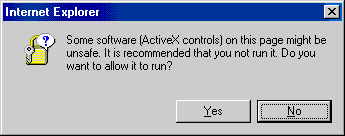
- If you have Internet Explorer 4.0 installed with the default security settings, HTML message script can access such components as the file system or the Outlook address book only if the user ignores this warning prompt:
More Information
- Viruses Affecting Microsoft Outlook

Donald Martineau says
Messages in my inbox can't be open. I get "Remote header item" message appears and none of the option their allow me to download the message. This problem has been around for sometime and Microsoft has not addressed it. Out look is worthless for me because I can't open my e-mails
Diane Poremsky says
What version of Outlook and what type of email account is configured in it? Remote header item sounds like you are using an older version of Outlook with an Exchange account configured to work offline.