We hear from a lot of users who receive the following error when they open Outlook for the first time after upgrading Outlook. (This frequently happens when using Easy Transfer to move the accounts to a new computer.)
"The connection to Microsoft Exchange is unavailable. Outlook must be online or connected to complete this action. "
Sometimes they mistakenly created the wrong account type; other times Outlook upgrades an older profile and gets it wrong. (Let Outlook's autodiscover create the email account automatically and it will create the recommended account type for your email domain.)
How can I remove Microsoft Exchange from my setup of my emails. I can't seem to remove it or change to an alternative. The mail icon in the control panel does not exist. I can't seem to locate the problem to change it...I've tried everything.
When you have the wrong type of account configured in Outlook you can easily remove the account and create the correct type of account. Because Windows groups the control panel applets, we recommend using search to find the Mail applet, instead of browsing for it.
 Go to Control Panel, search for Mail. If you use 64-bit Windows and 32-bit Outlook, it will be named "Mail (32-bit)"
- Double click on Mail (or Mail (32-bit)).
- Click Email account button

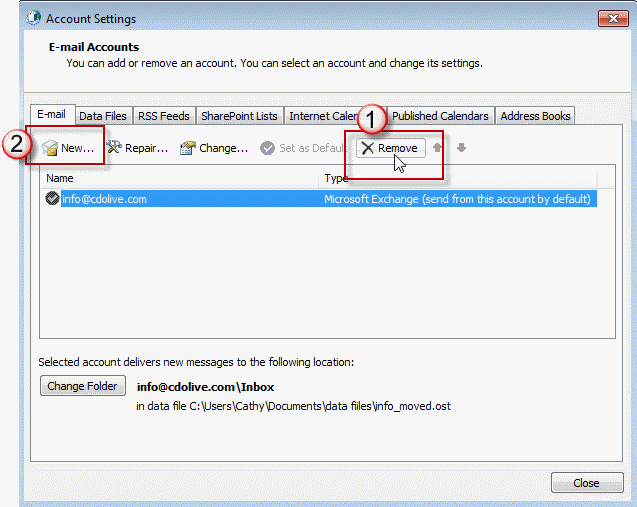
- Select the wrong account and click Remove. (If you only have one account listed in your profile, you may need to create a New account first (Step 5), set it as default then remove the wrong account.)
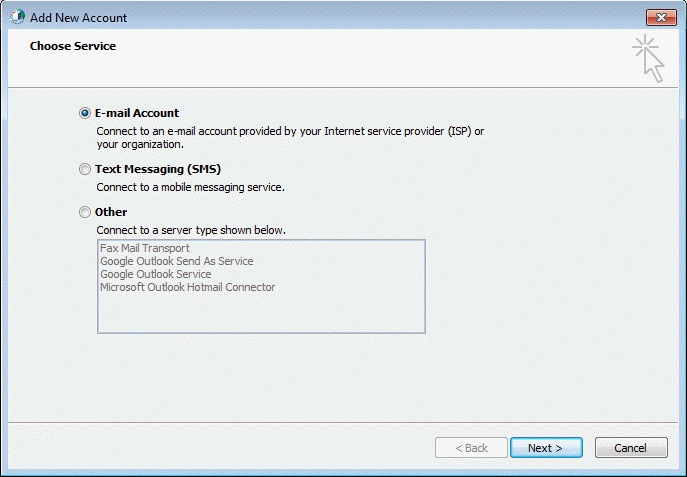
- Click New, select Email Account for POP3 or IMAP accounts, or select Other then the correct account type.
- Fill in your preferred display name, email address and password on the Add New Account dialog.
- Outlook will look for published account configuration for the domain and setup the account automatically.
 Go to Control Panel, search for Mail. If you use 64-bit Windows and 32-bit Outlook, it will be named "Mail (32-bit)"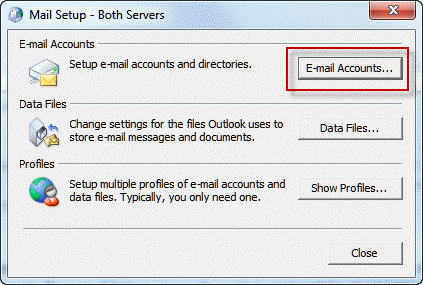
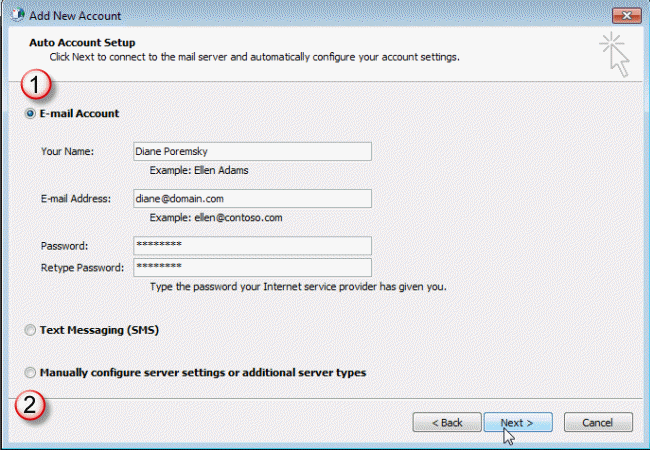
In the event your email provider does not publish autodiscover information, you'll need to set up the account yourself. Check your mail providers support site for the proper configuration then check the box to Manually configure the account at the bottom of the Add New Account dialog. (#2 in the screenshot above)

Donnie says
So... Here's my sitch.. I'm just trying to connect my Microsoft account to my work outlook (2010). I don't get any emails on this account. I just want the group calendar to show up on Outlook.
OH, the other thing is that it's based on a gmail account. So if I go to add an email account and use the xxxx@gmail.com, I'm pretty sure it will route my actual gmail email there, which is what I don't want to do.
Any ideas, and please ELI5...
Diane Poremsky says
You need to set up an alias for outlook.com and then add it to outlook using autoaccount setup.
https://www.slipstick.com/outlook/outlookcom/outlook-com-migration-status/
Ken The Chef says
I have just read through the above content. it might as well been in martian as far as i am concerned. what on earth was that all about. i have MS365 for a fee and with all that technology and it will not allow me to create an email group 2010 was great . Why did you change it/remove the group email. ANGRY!
Diane Poremsky says
Email groups as in "Contact Group" or "Distribution list"? If this is with your hotmail account, you are on the old server - it supported groups, but not in the same way outlook desktop does. The new server is on Office 365 and everything is supported. After your account is migrated you can add it back using auto account setup and will then have the contact groups. https://www.slipstick.com/outlook/outlookcom/outlook-com-migration-status/ has more details.
Marci says
I've imported a pst file into OUtlook 365 and I am able to send emails but not receiving them. I am receiving them in the outlook365 webmail tho. There is no error, just folder updating at bottom of outlook365. I created a personal folder and added the old pst files there so they can be separate from the current Inbox. From my research, Microsoft says delete the account and re-create it.
1. Do you think this is the best approach?
2. If I delete the account then re-create the account will all the emails and files that were there before repopulate? Or would deleting and recreating remove all emails and file folders?
Thanks!
Angela Houkamau says
I hope you can help. I have followed your instructions because I setup a exchange account instead of a pop3. When using control panel mail I get everything setup and correct yet when testing it keeps asking for the password as if I have it wrong. I have checked by logging into my emails on the web and no problem there. Please help.
Diane Poremsky says
Do you have multifactor authentication enabled for your account? If so, you need to use an app password, not your real password.
If its not that, which version of Outlook do you use? Do you have a space in the password?
soldiersraywanda says
Thank you so much! I have been struggling with this for months and I can FINALLY use my email address to send my attachments, etc. I truly appreciate the help!!!
Tom E says
When adding a new email account it cannot log on to server How can I fix this?
Diane Poremsky says
What type of email account? Does it give you any more information?
KK says
Thanks alot the above solution has worked for me....good job!!!!!!
Anthony Johnson says
After a day of reading rubbish about reg removal this was perfect!
Sion Mwatukange says
Helpful information solved the problem. Thanks guys
Yota says
Hi Diane, I tried to follow the instructions. When I click on Mail, the file does not open. What can I do now?
Diane Poremsky says
Do you get any error messages? The profile may be corrupt - to fix it you need to delete the profile key from the registry. Which version of Outlook do you use? In Outlook 2010 and older, the key is in a different location than in Outlook 2013.
DON E. STOTT says
I am unable to use my word to write a simple letter. I am informed that "your office 365 has expired" though controlling my word. Please disable the program so I can return to the former. This "blocking" by office 365 is extremely frustrating.
Diane Poremsky says
If the expired notice comes up when your subscription is still valid, try signing back in, in File, Accounts (or File, Office accounts in Outlook). If it has expired, you'll need to re-subscribe - the subscriptions are valid for one year. You can log into https://office.microsoft.com/en-us/MyAccount.aspx using your Microsoft account at to check.
Willie Redmond says
Hello, it seems that most here "do not" have an exchange account that they are trying to add. However, I do have one. I am getting the same messages as they did. I was able to start over (as suggested above) and add my hotmail account, but I am still getting the same message when I try to add my exchange account. It tells me ...
"the connection to microsoft exchange is unavailable"... and
"problem connecting to server"
It first tries to automatically add... then it prompts me to manually add... but nothing works.
Thanks in advance!
Venkat says
Fantastic!!!!!!!!!!!!!!!!!!
I mistakenly setup exchange server and I struggled for couple of hours before I saw these instructions. These instructions worked. :)
Thanks! a bunch Diane
C.Kosmoski says
I'm trying to remove the favorites and the prior profile I had on the main screen when I just open Outlook 2010?
Diane Poremsky says
Open Control panel, search for Mail. Open the Mail applet, click Profiles then delete the current profile.
beth says
Sorry, but none of this makes sense. Why do I have to re-create a new email, why do I have to make a data file to save my email data? and further more I am not fluent in IT language.
I have tried this five times and am getting annoyed. I just want to sync my personal email with the thing and start using it, not spend hours trying to just get it started and I don't want to create a new email.
Diane Poremsky says
Those instructions are targeting a specific situation that affects many people when they upgrade from an older Outlook to Outlook 2010 or 2013 and may not apply to your situation.
What type of email account are you using? Did you already have an Outlook profile set up? What happens if you add your account to Outlook?
rania says
i get that same error but i cant even open outlook to go to the control panel? help :(
Diane Poremsky says
Try the steps at https://www.slipstick.com/problems/error-opening-control-panels-mail-applet/
Nancy Lewis says
Thanx for responding. I deleted the original email profile and then reinstalled it. It took four tries to get it to take, but I am now going through a couple hundred old emails.
Nancy Lewis says
I am trying to get my email account back to Outlook. I moved the host from ATT to Network Solutions. The email only shows up as webmail now. I have deleted and recreated the email settings, but it still won't go to outlook. What to do?
Diane Poremsky says
What type of email account are you using? Did you delete the att account from your profile and start over with a new account?
powergate77 says
Hello Diane, What is a pst or exchange account. I keep getting that in my error message, and don't know what it is. Please help!
Diane Poremsky says
A pst is a Personal Folders file - this is the data file Outlook uses for POP3 email, for archives etc. Exchange account is an exchange server mailbox.
What is the exact error message?
Kelly S. says
Thank you Dianne!!! That was exactly what I needed. This has been so frustrating because I can't even sync my iphone since the change to outlook. This took just a few minutes. Thank you for saving my the $150 the online help people wanted charge.
Carla says
I am trying to add a new (POP3) mail account and have an existing Exchange account that is no longer valid. When I try to delete the Exchange account, it keeps saying it cannot be deleted because a file is in use. Any ideas?
Diane Poremsky says
Did you add the POP3 account already? And add a pst to deliver the email to? Also, if you want to keep any of the Exchange account appointments, contacts, or email, you should export it to a pst. You can then use the exported pst as the pst for the new account.
Dixit says
Superb !!!
Joana Angel says
Thank you very much.... This information was really helpfull and precious to me, since nobody in the office did not know how to create an account on outlook
lynde hartman says
thank you so much for this info!!! your direction were easy to follow & fixed the problem! yea!!
Mathieu Hyatt says
OUTSTANDING!!!!!!! Simple instructions that work and wihout paying the rediculous $50 that Microsoft wants to charge to answer your questions.
Thank you.
Mike says
Thanks you for the information, it fixed the problem.